Brand Strategy, UX Design, Conversion Strategy and Functional Prototyping
Repositioning a 5-Star Handyman Business as a Complete Property Services Partner
Kore is an independent, launch-ready redesign concept for a Houston handyman business with an excellent local reputation but an outdated digital experience. I repositioned the company as a broader property-maintenance partner and developed a connected customer journey that helps homeowners, landlords, property managers, sellers, and commercial clients identify services, understand approximate costs, and choose the appropriate next step.
The project combines competitive research, brand strategy, conversion-focused copywriting, UX and UI design, service architecture, lead-capture tools, functional prototyping, launch planning, security considerations, and performance measurement.
Project Information
- Brand
- Kore Property Maintenance Services
- Market
- Houston, Texas
- Original business
- Handyman Around the Corner
- Platform
- Base44 (AI-assisted development) · HTML/CSS/JavaScript customization · GitHub version control and code transfer
- Project status
- Independent launch-ready prototype
- My role
- Research, positioning, strategy, UX, copywriting, functional planning and visual direction
Transparency
This project was developed independently as a portfolio redesign concept. The website and customer experience were designed as a launch-ready system that could support an operating property-services business after replacing sample content with verified business data, connecting live integrations, and completing final legal, accessibility, security, and production testing.
Mobile view
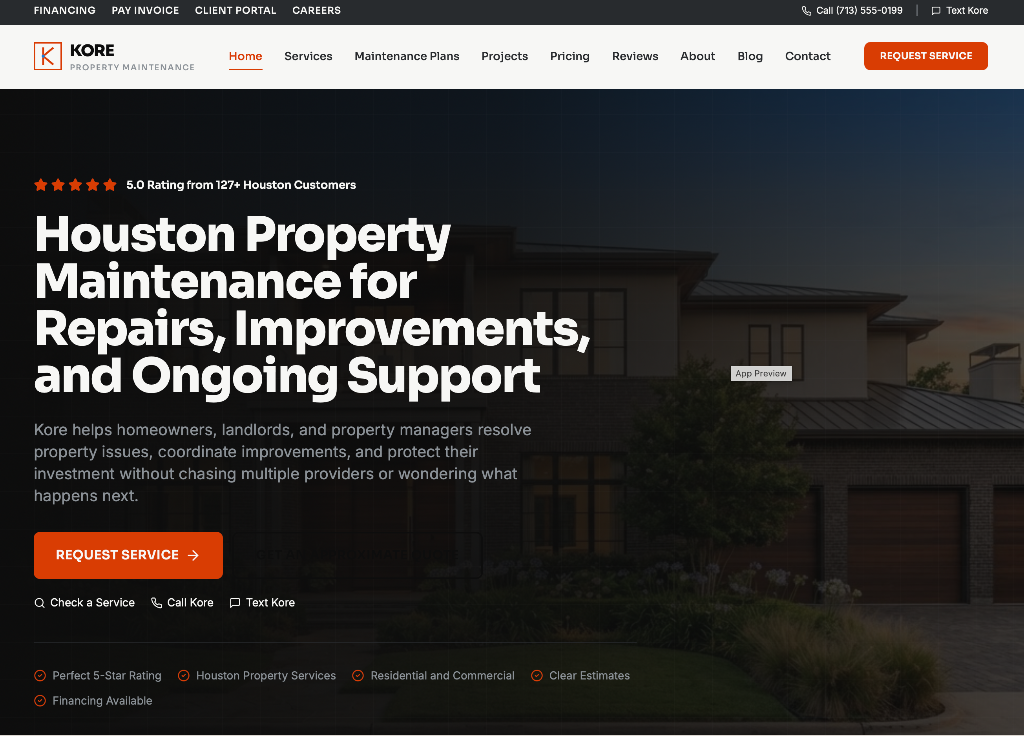
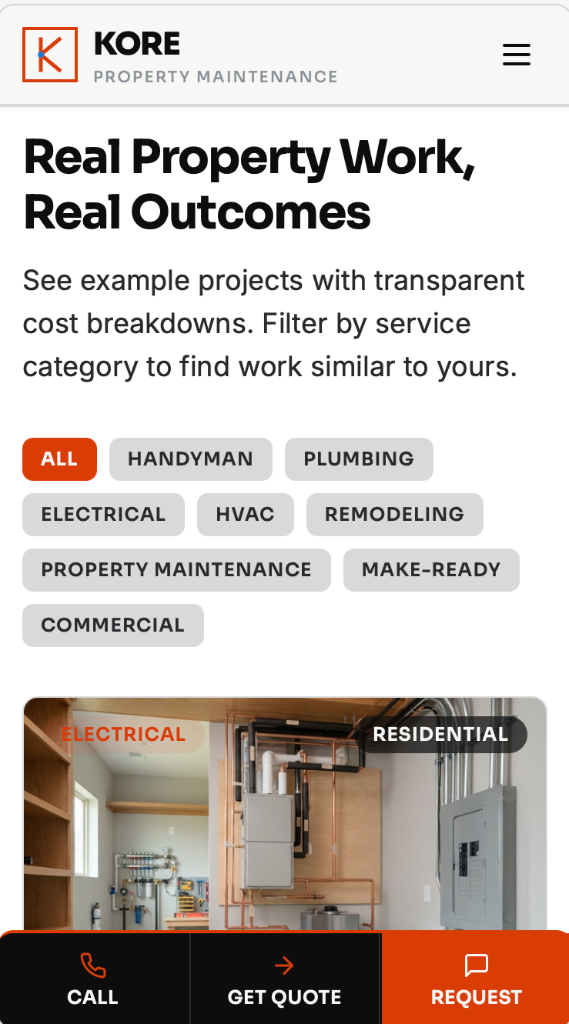
The homepage leads with a 5-star reputation indicator, the positioning statement, and three immediate conversion paths: Service Checker, Call Kore, and Text Kore. The mobile experience adds a persistent sticky action bar (Call, Get Quote, Request) visible at every scroll position.
Development Approach
- Base44 : AI-assisted web development
- HTML/CSS/JavaScript : Generated-code refinement and customization
- GitHub : Code transfer, version control, and continued development
Developed through a strategy-led Base44 workflow involving structured prompting, conversion and UX direction, iterative interface refinement, and informed customization of the generated HTML, CSS, and JavaScript. Project code can also be transferred to GitHub for version control, continued development, or deployment when required.
The Project at a Glance
The original company already possessed one of the most valuable assets a local property-services business can have: an excellent customer reputation supported by perfect 5-star reviews.
The problem was not a lack of credibility. The problem was that the existing digital experience did not fully communicate that credibility, the breadth of the company's capabilities, or the long-term value it could offer property owners.
Instead of producing another handyman website built around a service list and contact form, I developed Kore as a broader property-services brand with connected tools that help visitors understand what the company handles, describe an issue, receive immediate approximate pricing, review transparent project examples, and determine the right next step.
Modernize an outdated local-service website without losing the approachable personality that made the original business feel trustworthy.
Expand the company from a task-based handyman position into a dependable property-maintenance partner.
Help customers understand what Kore handles, what similar work may cost, and what action makes sense before they contact the company.
A conversion-focused website and functional prototype combining reviews, project examples, approximate pricing, service intelligence, assessments, maintenance plans, payments, scheduling, and customer-account features.
Acquisition, Conversion, and Ongoing Support
Acquisition
Conversion
Ongoing support
A Strong Reputation With an Underdeveloped Digital Experience
Handyman Around the Corner
Before
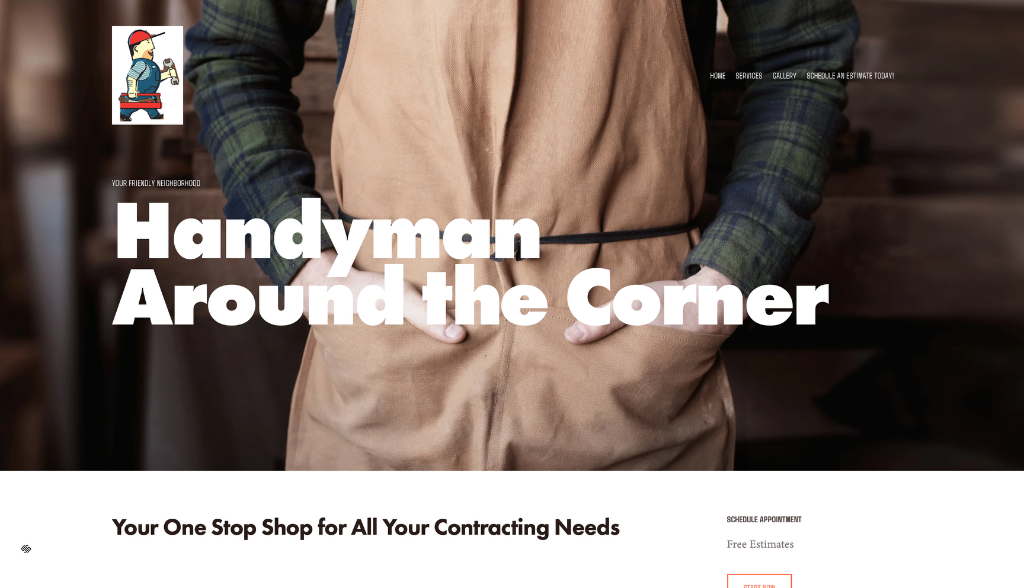
- Local and approachable
- Handyman-focused positioning
- Basic service communication
- Limited decision support
- Limited pricing guidance
- Traditional inquiry pathway
Kore Property Maintenance Services
After
- Broader property-services positioning
- Stronger service architecture
- Connected conversion tools
- Pricing transparency
- Multiple customer audiences
- Ongoing support infrastructure
Decision
Replace a handyman hero with a property-services partner positioning supported by a 5-star reputation indicator.
Why
The original business was already trusted for more than handyman tasks. The website needed to reflect the full scope of what customers relied on it for.
Value
Visitors understand the breadth of services within the first scroll and see social proof before reading a single line of body copy.
The original business built real trust through honest, capable work. The goal of this redesign is to extend that same trust into the digital experience, not to dismiss what already worked.
The design challenge was not simply to make the website look newer. It was to turn the website into a clearer decision-making and lead-capture system.
Studying the Houston Handyman and Property-Service Market
I reviewed leading handyman and property-services websites in the Houston market to understand how competitors communicated services, reviews, offers, pricing, maintenance, and customer support.
The research revealed several strong market practices, including detailed service pages, maintenance plans, online bill payment, promotional offers, project-cost examples, property assessments, and positioning directed toward sellers and property owners.
It also revealed an opportunity to connect these features into a more cohesive customer experience instead of presenting them as separate website additions.
What Competitors Did Well
Detailed service explanations, strong local messaging, dedicated service pages, reviews, service-area information, and visible calls to action.
What Was Often Missing
Immediate pricing guidance, connected decision tools, property-specific customer journeys, and a simple way to ask whether a company handles an unusual task.
What Customers Still Had to Do
Interpret long service lists, contact the business before receiving useful pricing context, and choose a service category without knowing industry terminology.
The Opportunity for Kore
Build a connected property-support experience that helps visitors identify the service, understand approximate costs, and continue directly into a service request.
A Key Market Gap: Pricing Transparency
Few competitors showed what work actually involves before asking a visitor to call. Publishing transparent project examples with labor, material, and total components was one of the clearest opportunities to reduce uncertainty before the first conversation.
Supporting evidence
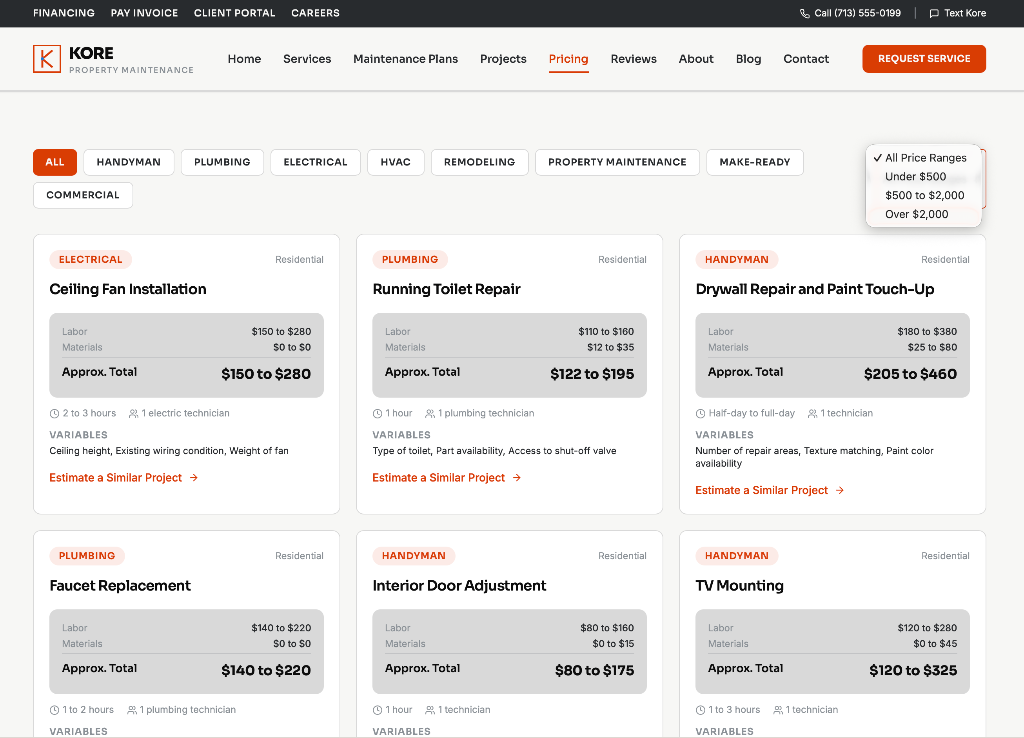
The website does not only ask for a lead. It gives the visitor something useful before requesting contact information.
From Handyman Tasks to Property Support
The word "handyman" accurately describes part of the company's work, but it limits how customers understand the business's potential value.
I repositioned the business as Kore Property Maintenance Services, a reliable property-services partner capable of supporting repairs, installations, plumbing, electrical work, HVAC, remodeling, preventive maintenance, seller and rental preparation, commercial properties, property assessments, project coordination, contractor oversight, and ongoing property support.
The company still offers practical handyman services, including furniture assembly and TV mounting, but those tasks now sit within a more complete property-services structure.
Kore helps Houston property owners handle repairs, improvements, installations, and ongoing maintenance through one dependable property-services partner.
Service Architecture
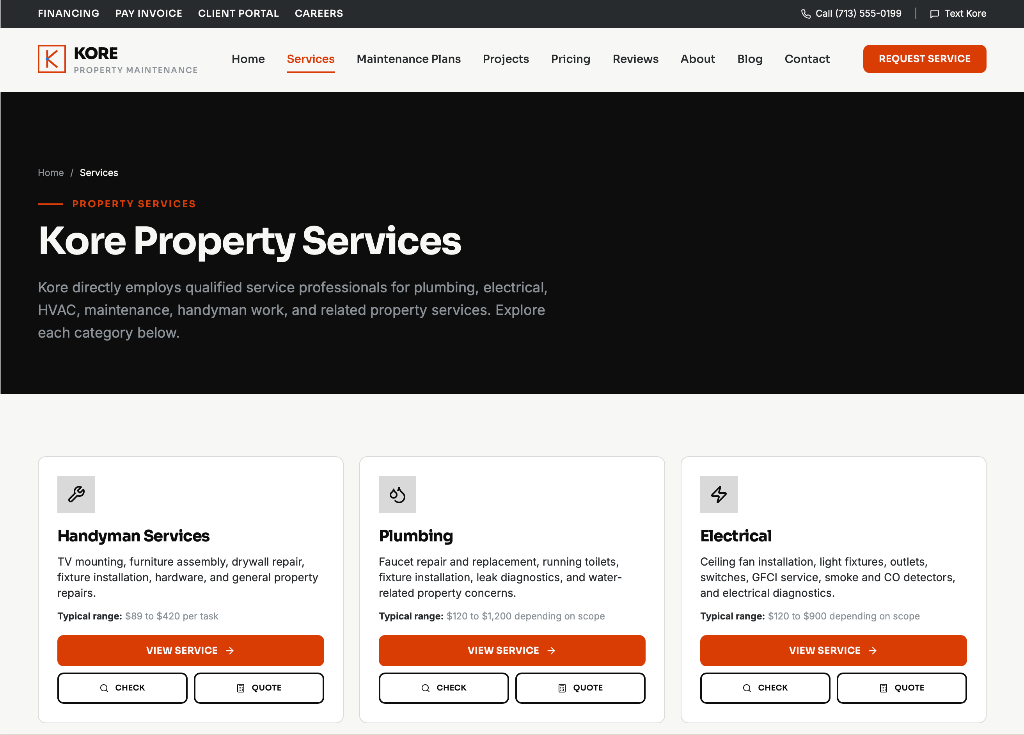
Eight Service Categories
Handyman work is preserved as one category among many, rather than the category that defines the business.
Each service page routes into the same Service Checker, quote tool, and request flow, so the broader positioning does not fragment the customer journey.
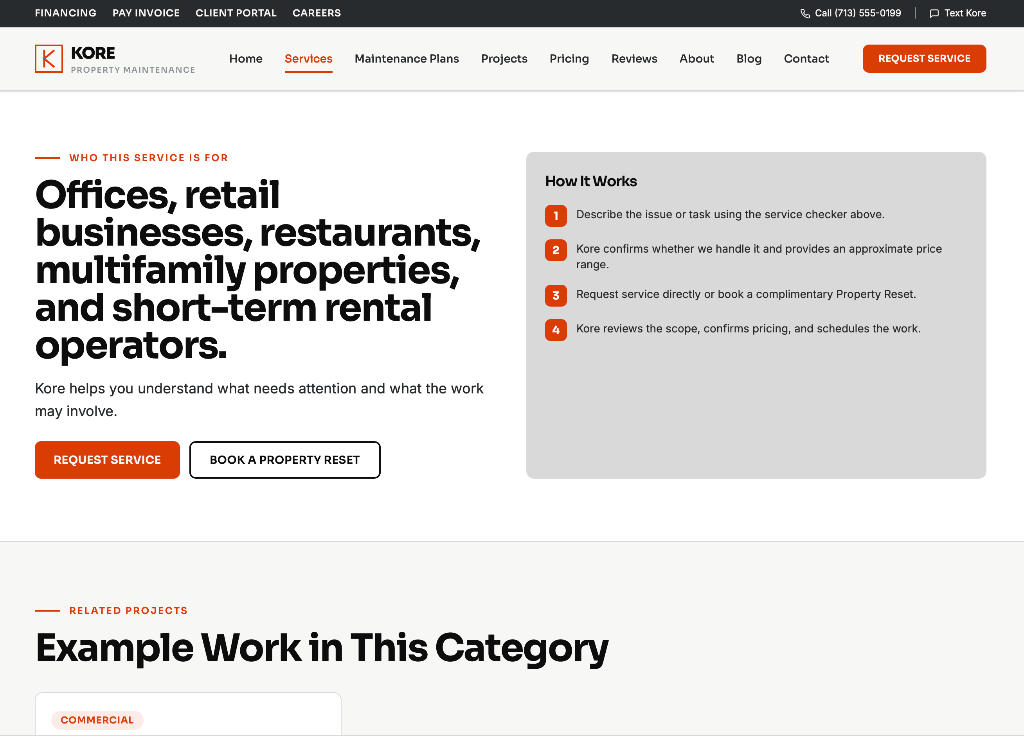
Reaching Commercial Audiences
The repositioning also opened the business to property managers, offices, retail, restaurants, multifamily properties, short-term rental operators, commercial landlords, and investors who need recurring support rather than one-off repairs.
Commercial audience
Why the Name Kore
Kore suggests the central support point for the property. The name is short, clear, modern, and broad enough to support expansion beyond individual handyman work.
The descriptor Property Maintenance Services provides immediate category clarity.
Professional Enough to Trust, Familiar Enough to Call
Kore uses the Everyman archetype.
The brand needed to feel capable and organized without becoming distant, overly technical, or corporate. Customers should feel comfortable describing an issue even when they do not know the proper service name.
The goal was to make Kore feel capable and modern while maintaining the relatability of the Everyman brand archetype.
Visual System in Practice
Homepage desktop
Services page
Homepage mobile
Color Evolution
I retained visual direction from the current brand rather than discarding every recognizable element. The original gray, orange, black, and white direction created a useful foundation. I refined that palette by using a more architectural orange, cleaner neutral tones, and a piercing blue accent to represent intelligence, clarity, movement, and the website's digital functions.
Retaining part of the original color direction allows the redesign to feel like an evolution of the existing business rather than an unrelated identity placed over it.
Kore Black
#0D0D0D
Base background and structure
Structural Charcoal
#292B2E
Panels and surfaces
Concrete Gray
#8B9197
Secondary text and lines
Soft Gray
#D9D9D9
Dividers and muted surfaces
Soft White
#F7F7F5
Primary text
Architectural Orange
#D93D04
Primary actions and strategic callouts
Piercing Blue
#147DD9
Digital tools, data, and deep links
Typography
Houston Property Maintenance
Supporting body copy in the clean sans used across the site.
Form and Card Components
Buttons 8px, small controls 7px, cards 10px, frames 12px, fields 8px.
Different Customer Questions, One Connected Customer Journey
Visitors do not arrive with the same knowledge or readiness.
Some know exactly which service they need. Others only know what is happening at the property. Some want pricing information before speaking with anyone. Others need recurring maintenance support, financing, property guidance, or help prioritizing several concerns.
These are not unrelated lead magnets.
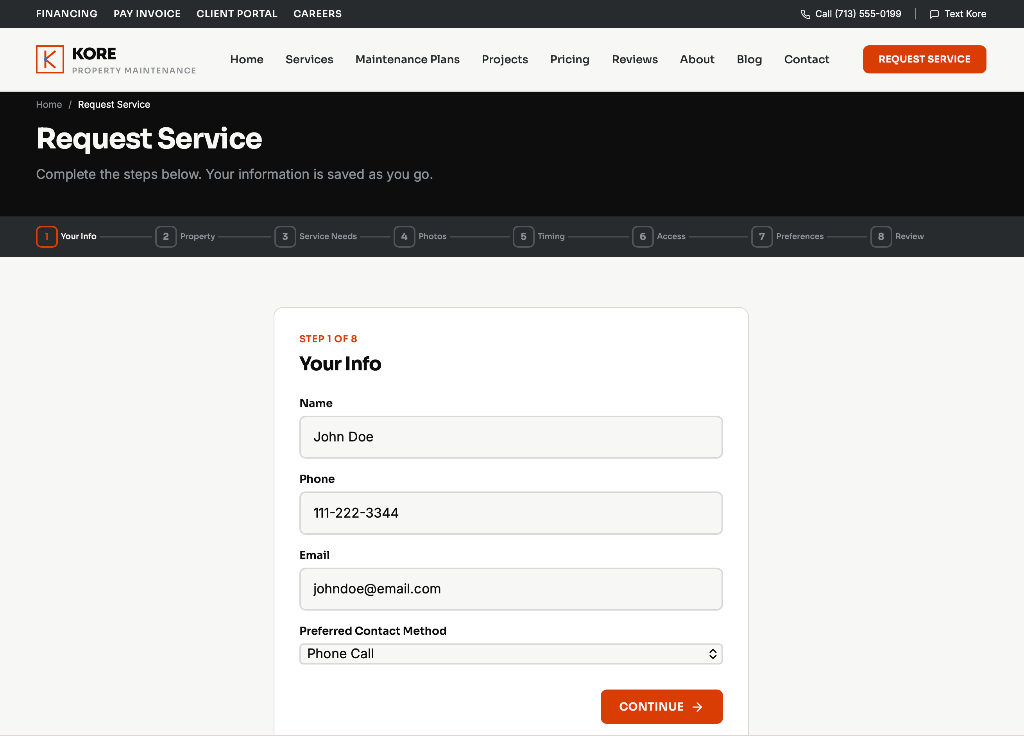
The visitor's information should move between the tools. A task entered into the Service Checker can become an approximate quote. The quote can become a service request. The request can become an appointment and later appear inside the customer's property record.
Each function reduces uncertainty for the customer while improving the quality of information the business receives.
The Connected Journey in Practice
Connected Journey
Tools Designed to Reduce Uncertainty and Create Better Inquiries
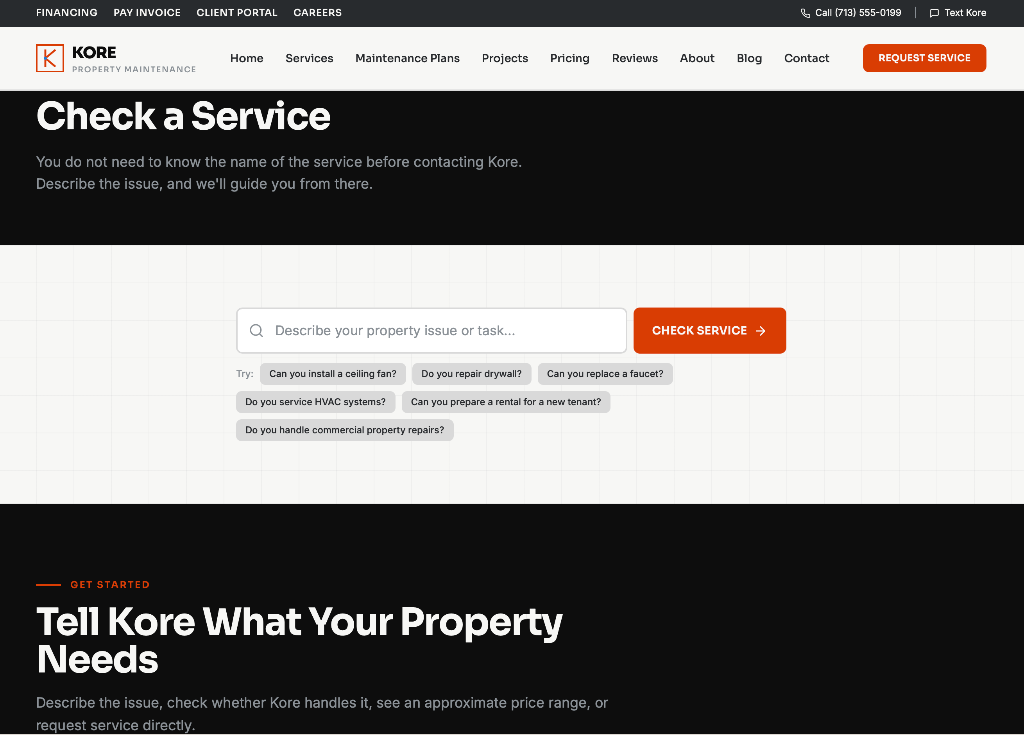
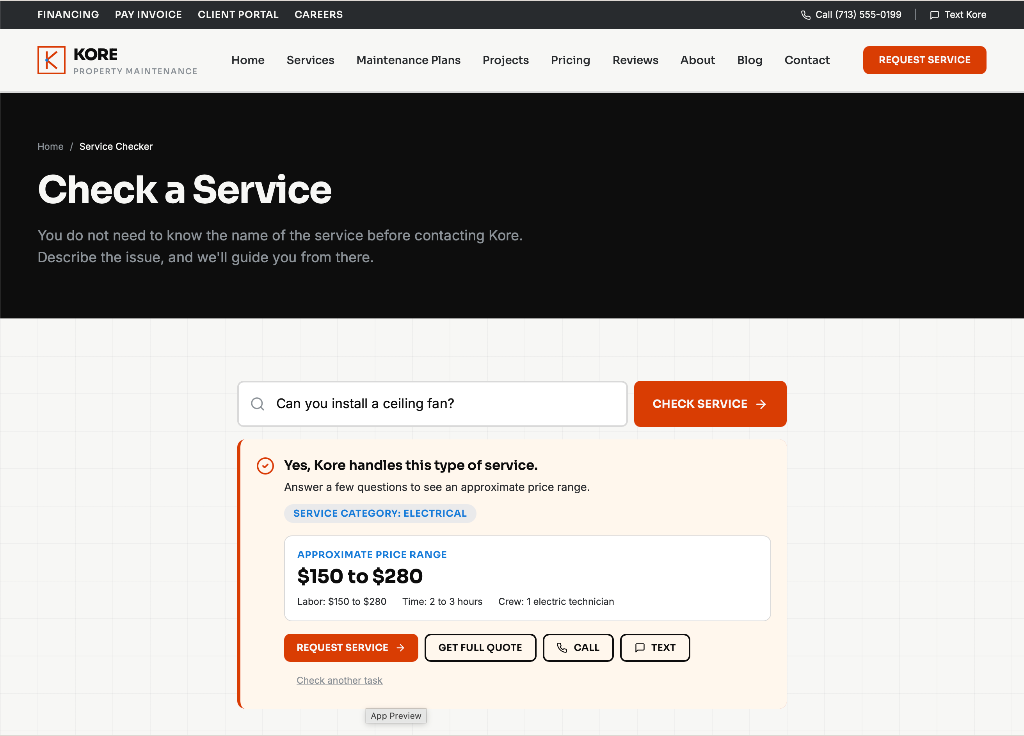
Helping Customers Ask the Question in Their Own Words
- Customer Problem
- Customers do not always know the correct service category for their issue.
- Strategic Decision
- Customers should not have to identify the correct trade or service category before contacting Kore.
- Customer Value
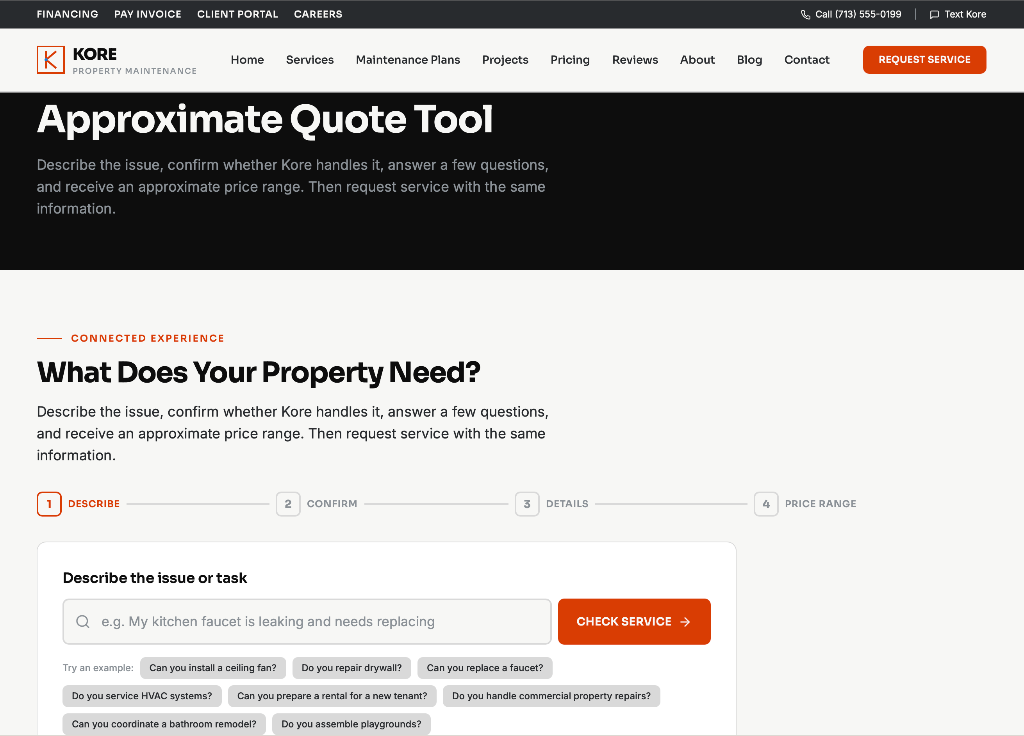
- Visitors can describe the issue in their own words and immediately learn whether Kore handles it.
- Business Value
- Kore receives the original issue description, likely category, property details, and initial scope before the first conversation.
- Lead-Capture Mechanism
- The visitor moves from the Service Checker into the quote or request flow without repeating information.
- Competitive Difference
- Most competitors provide static service lists. Kore interprets the customer question and guides the next action.
Service Checker input
Service Checker result
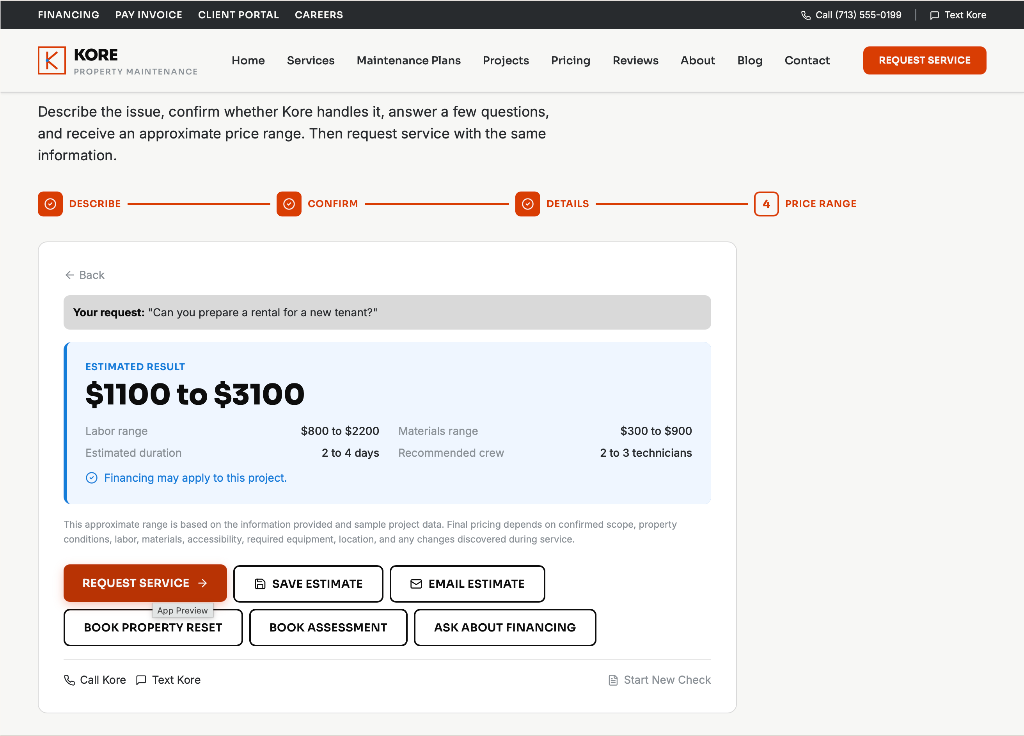
Providing Useful Pricing Context Before the Sales Conversation
- Customer Problem
- Price uncertainty prevents many visitors from inquiring.
- Strategic Decision
- A generic quote form captures contact information but provides no immediate customer value.
- Customer Value
- The user receives an approximate range, possible cost components, expected duration, and variables that may affect final pricing.
- Business Value
- The company receives a more developed scope containing quantity, measurements, condition, location, urgency, accessibility, and optional images.
- Lead-Capture Mechanism
- After viewing the range, the visitor can save it, email it, request service, book an assessment, or ask about financing.
- Competitive Difference
- Pricing guidance, education, and conversion happen within one connected experience.
Quote Tool input
Quote Tool result
Start With What Your Property Needs Most
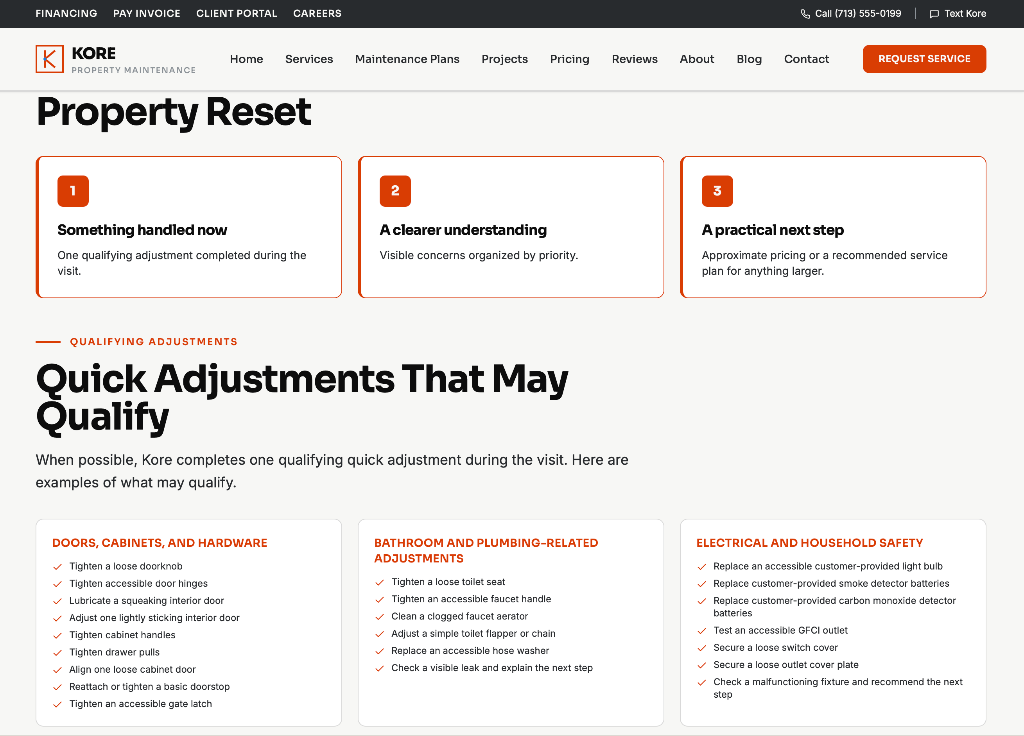
- Customer Problem
- A new customer has no low-risk way to start with Kore.
- Strategic Decision
- Offer a complimentary introductory visit that creates real utility.
- Customer Value
- The new customer receives a complimentary introductory assessment, one qualifying adjustment when possible, organized priorities, and a practical next step.
- Business Value
- Kore earns an opportunity to demonstrate service quality, identify legitimate needs, and introduce ongoing property support.
- Lead-Capture Mechanism
- The Property Reset can lead into an estimate, assessment, service request, or audience-specific maintenance plan.
- Competitive Difference
- The offer creates real utility instead of simply lowering the price of an unknown service.
Property Reset
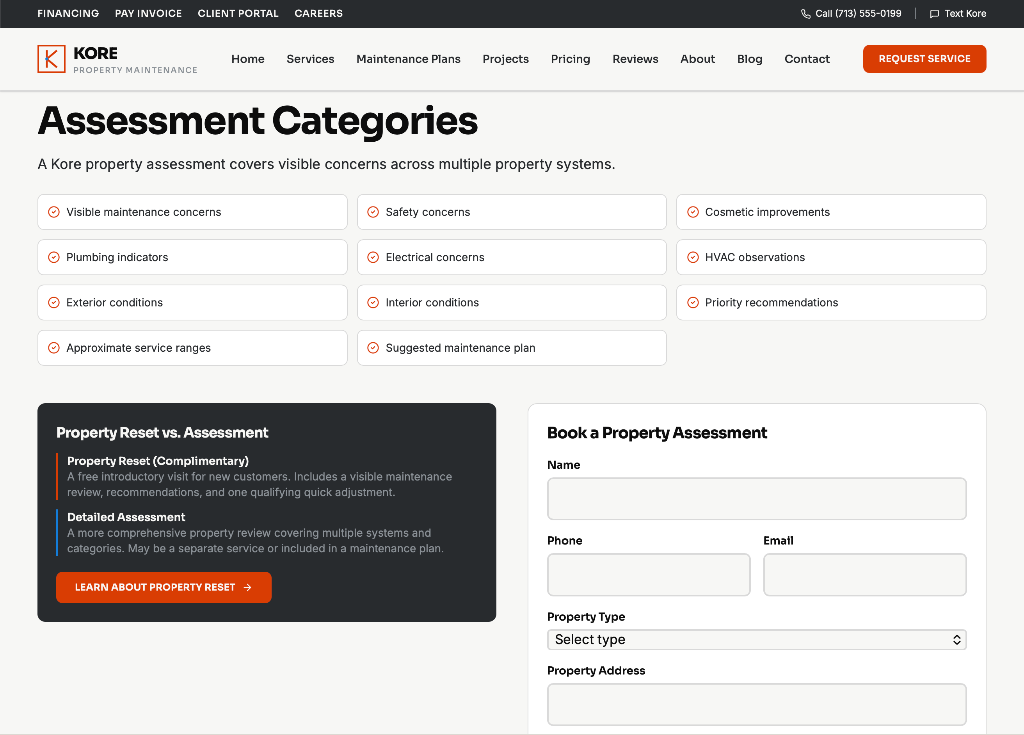
Property Assessment
Showing What Property Work Actually Involves
- Customer Problem
- Visitors cannot tell what a project will cost or include.
- Strategic Decision
- Publish project examples with transparent components and variables.
- Customer Value
- Visitors compare similar work with labor, material, equipment, timeframe, and approximate total.
- Business Value
- Kore sets expectations and pre-qualifies serious inquiries.
- Lead-Capture Mechanism
- Each example offers an Estimate a Similar Project action that enters the quote flow.
- Competitive Difference
- Few competitors show what work actually involves before contact.
Project Pricing
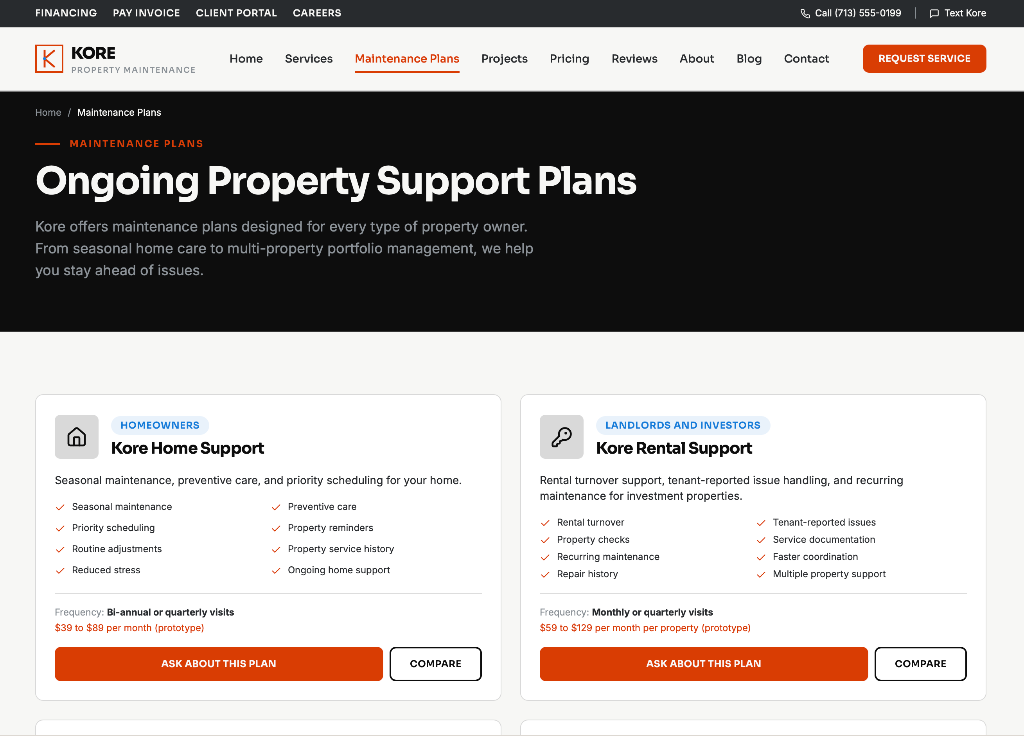
Building Ongoing Support Around Different Property Owners
- Customer Problem
- One plan cannot fit homeowners, landlords, and commercial owners.
- Strategic Decision
- Organize plans around customer operating models, not generic price tiers.
- Customer Value
- Each owner type finds ongoing support that fits how they manage property.
- Business Value
- Kore builds recurring revenue and clearer segmentation.
- Lead-Capture Mechanism
- Each plan drives a plan inquiry that routes to the right onboarding.
- Competitive Difference
- Plans are designed around how the customer operates, not a price ladder.
Maintenance Plans
Turning Completed Jobs Into an Organized Property Record
- Customer Problem
- After a job, customers lose track of history, estimates, and records.
- Strategic Decision
- Give every customer a persistent property record.
- Customer Value
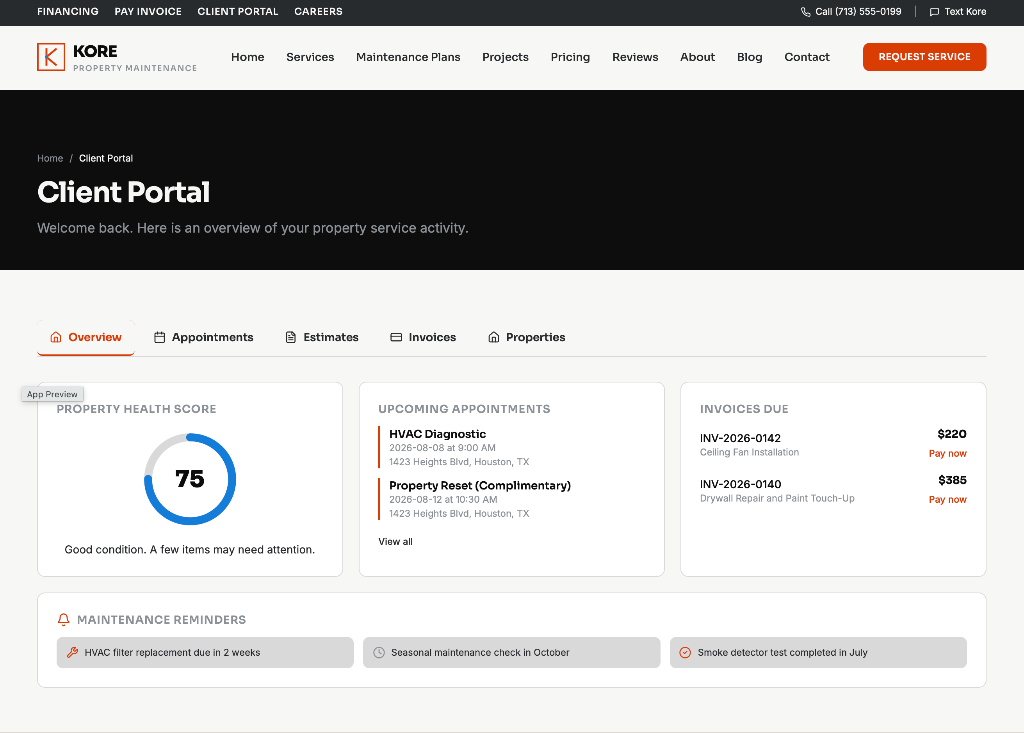
- Access property profiles, service history, saved estimates, appointments, invoices, photos, findings, and recommendations in one place.
- Business Value
- Kore increases retention, repeat service, and referral value.
- Lead-Capture Mechanism
- The portal surfaces reminders and recommendations that drive the next booking.
- Competitive Difference
- Most local services disappear between jobs. Kore stays present.
Client Portal
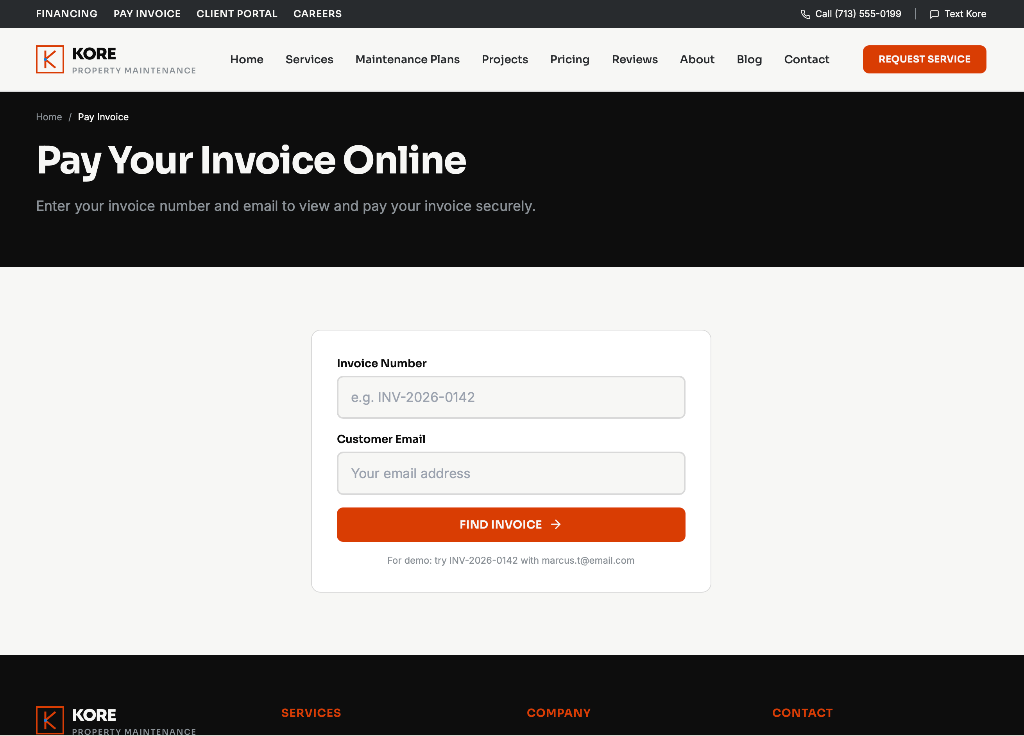
Reducing Administrative Friction After Service
- Customer Problem
- Payment by phone or mail slows collection and creates follow-up.
- Strategic Decision
- Let customers look up and pay invoices online.
- Customer Value
- Pay faster with lookup and confirmation, convenient for recurring clients.
- Business Value
- Faster payment and reduced administrative follow-up.
- Lead-Capture Mechanism
- Payment confirms the relationship and feeds portal records.
- Competitive Difference
- Online invoice payment is expected but often missing from local services.
Pay Invoice
Structuring the Homepage Around Trust, Proof, and Decision Support
Homepage Order
- 01Hero
- 02Connected reviews
- 03Project gallery
- 04Service categories
- 05Service Checker and approximate quote experience
- 06Property support
- 07Complimentary Property Reset
- 08Maintenance plans
- 09Transparent project pricing
- 10Why Kore
- 11Financing, payments, and client access
- 12FAQ
- 13Final call to action
Why Reviews Appear Second
The original business's perfect 5-star reputation is one of its strongest assets. Trust should not be buried near the bottom of the page.
Why the Gallery Appears Third
Visitors can connect customer praise with visible project work, pricing context, scope, and outcomes.
The homepage leads with trust and proof, then moves into decision support so visitors can act on what they see.
Designing the Property-Service Experience for Mobile
Most property owners search for help on their phone while standing in the room where the problem is. The mobile experience was designed to get them from a question to an action without scrolling through unnecessary steps.
A persistent sticky bar keeps the three primary conversion actions within thumb reach at every scroll position, so visitors can call, start a quote, or request service from anywhere on the page.
Mobile Priorities
Sticky Mobile Action Bar
Three actions stay pinned to the bottom of the screen: Call, Get Quote, and Request. The bar appears on the homepage and on every service page so a conversion path is always one tap away.
Mobile homepage
Writing for Customers Who May Not Know What to Ask For
The copy strategy avoids assuming that visitors understand property-service terminology.
Instead of requiring the customer to choose the correct trade immediately, the site invites them to describe what is happening.
Hero copy
Service Checker copy
Property Reset copy
Houston Property Maintenance for Repairs, Improvements, and Ongoing Support
Kore helps homeowners, landlords, and property managers resolve property issues, coordinate improvements, and protect their investment without chasing multiple providers or wondering what happens next.
Why This Copy
The headline establishes location, category, and service breadth without reducing the company to handyman work.
The subheadline addresses the frustration of coordinating several providers and the uncertainty of not knowing what happens next.
Intentionally Avoided Phrases
- Honey-do list
- No job too small
- One-stop shop
- Project list
- Odd jobs
- Cheap handyman
A Scalable Service and Content System
Property Service Pages
- Handyman Services/services/handyman-services
- Plumbing/services/plumbing
- Electrical/services/electrical
- HVAC/services/hvac
- Remodeling/services/remodeling
- Property Maintenance/services/property-maintenance
- Make-Ready Services/services/make-ready-services
- Commercial Property Services/services/commercial-property-services
Conversion and Decision Tools
Ongoing Customer Support
Business and Supporting Pages
Every page name links directly to its published Kore route.
Explore the Complete Kore Website System
Kore was designed as a complete property-services platform, not only a homepage. Explore the full site, browse individual routes, or follow a guided tour of the strategic customer journey.
30-Page Property Services Website
All 30 Pages
Every page opens its exact published route in a new tab. Use the filters to explore by category.
/Introduces Kore, the service breadth, and the primary conversion paths.
Open Live Page/servicesOrganizes every service category into a clear, browsable structure.
Open Live Page/services/handyman-servicesExplains handyman tasks like assembly, mounting, and small repairs.
Open Live Page/services/plumbingDescribes plumbing repairs, fixture work, and common fixes.
Open Live Page/services/electricalCovers outlets, fixtures, panels, and safety checks.
Open Live Page/services/hvacExplains heating, cooling, maintenance, airflow, thermostat, and diagnostic capabilities.
Open Live Page/services/remodelingOutlines improvement projects and coordination support.
Open Live Page/services/property-maintenanceDescribes preventive and ongoing maintenance support.
Open Live Page/services/make-ready-servicesCovers seller and rental preparation services.
Open Live Page/services/commercial-property-servicesExplains recurring commercial property support.
Open Live Page/maintenance-plansPresents Home, Rental, Business, and Portfolio support plans.
Open Live Page/projectsShows project examples with scope, type, and pricing context.
Open Live Page/pricingShares transparent project cost examples and variables.
Open Live Page/reviewsSurfaces the 5-star reputation and review themes.
Open Live Page/blog/sample-property-maintenance-articleDemonstrates article structure, internal linking, and conversion content.
Open Live Page/contactOffers direct contact and routing for ready visitors.
Open Live Page/request-serviceGuides a structured service request with scheduling.
Open Live Page/quote-toolProvides approximate pricing with cost components and variables.
Open Live Page/service-checkerLets visitors describe an issue and learn if Kore handles it.
Open Live Page/property-resetOffers a complimentary introductory property assessment.
Open Live Page/property-assessmentBooks a prioritized property assessment.
Open Live Page/financingExplains financing options for larger projects.
Open Live Page/pay-invoiceLets customers look up and pay invoices online.
Open Live Page/client-portalProvides property profiles, history, estimates, and records.
Open Live Page/careersLists open roles and accepts applications.
Open Live Page/accessibilityDocuments accessibility commitments.
Open Live PageDesigning Beyond the Interface
The project includes functional prototypes for the tools visitors and customers actually use, not just static screenshots.
Structured Data Thinking
The experience was planned around structured customer, property, service, estimate, appointment, project, assessment, invoice, payment, review, plan, and service-history data.
Planning for Launch, Privacy, and Ongoing Security
Because the Kore experience includes customer accounts, property addresses, uploaded images, estimates, service records, invoices, and payment-related functions, security cannot be treated as a final technical detail. It must be considered during the design of forms, permissions, account access, storage, and administrative workflows.
Access Control
- Separate customer, technician, manager, and administrator roles
- Row-level permissions
- Restricted access to submissions, estimates, invoices, and files
- Staff permission reviews
- Immediate removal of inactive user access
Customer Data Protection
- Secure authentication
- Email verification
- Strong password requirements
- Multi-factor authentication where supported
- Encrypted transport
- Private record storage
- No credentials stored in public code
Forms and Uploads
- Server-side validation
- File-type restrictions
- File-size restrictions
- Spam protection
- Rate limiting
- Sanitization
- Clear file-retention rules
Payments and Financing
- Established providers
- No direct storage of full card details
- Restricted financial-record permissions
- Transaction and administrative audit records
Ongoing Security Management
- Full review before launch
- Security scan before production release
- New scans after significant changes
- Monthly application security review
- Quarterly role and permission review
- Authentication and administrative monitoring
- Third-party integration review
- Backup and recovery procedures
- Documented security issue process
The case study explains the security architecture and ongoing management plan without claiming that production security has been fully validated before the final deployment review.
Designing the Experience to Be Measurable
Because Kore is currently a prototype, this case study presents the KPI framework, tracking architecture, and dashboard strategy as planned measurement rather than historical business performance.
Planned Funnel
Website Acquisition
- Total sessions
- Organic search traffic
- Local search traffic
- Direct traffic
- Referral traffic
- Campaign traffic
- New and returning visitors
- Service-area traffic
- Service-page entrances
Engagement
- Service Checker starts
- Service Checker completions
- Quote-tool starts
- Quote-tool completions
- Project-pricing interactions
- Gallery engagement
- Review engagement
- Maintenance-plan views
- Property Reset views
- Client portal registrations
Conversion
- Request Service submissions
- Quotes saved
- Quotes emailed
- Property Reset bookings
- Property Assessment bookings
- Click-to-call actions
- Click-to-text actions
- Financing inquiries
- Maintenance-plan inquiries
- Commercial requests
- Qualified lead rate
- Visitor-to-lead conversion rate
Sales and Revenue
- Lead response time
- Appointment-booking rate
- Estimate completion rate
- Estimate acceptance rate
- Average project value
- Revenue by service
- Revenue by customer type
- Revenue by source
- Time from inquiry to booking
- Cost per qualified lead
- Customer acquisition cost
Retention
- Repeat-service rate
- Maintenance-plan enrollment
- Plan retention
- Portal usage
- Reminder-driven bookings
- Reactivation
- Review completion
- Referrals
- Revenue per customer
- Property lifetime value
Sample KPI Dashboard
Sample data, not real resultsTotal sessions
4,820
Service Checker completions
736
Quotes saved
214
Property Reset bookings
58
Request Service submissions
132
Visitor-to-lead rate
2.7%
Sample figures illustrate the dashboard layout and do not represent actual performance.
Exploring the Work as a Real Experience
The project deliverables are designed to be explored as interactive experiences rather than viewed only as screenshots. Website pages, campaign concepts, emails, dashboards, and future strategy projects can be opened and reviewed as working digital deliverables.
Kore Website System
- Marketing Function
- Website, conversion, and customer experience
- Business Problem
- A trusted business needed a digital experience that matched its reputation.
- Strategic Objective
- Build a connected 30-page platform, not a homepage and a contact form.
- Key Decisions
- Service intelligence, approximate pricing, Property Reset, maintenance plans, and a client portal.
- Measurement Plan
- Sessions, tool starts, quote completions, bookings, and visitor-to-lead rate.
- Connection
- Foundation for every future campaign project.
Live Website
Future Interactive Deliverables (GitHub hosted)
Social Media Campaign
Configurable GitHub URL will connect here when the project is complete.
Coming SoonEmail Strategy and Automation
Configurable GitHub URL will connect here when the project is complete.
Coming SoonAdvertising Strategy
Configurable GitHub URL will connect here when the project is complete.
Coming SoonContent Marketing Strategy
Configurable GitHub URL will connect here when the project is complete.
Coming SoonKPI and Reporting System
Configurable GitHub URL will connect here when the project is complete.
Coming SoonExpanding Kore Into a Connected Marketing System
The website establishes Kore's positioning, service architecture, conversion paths, and customer-data foundation. Additional projects will extend the same strategy across acquisition, follow-up, retention, content, and measurement.
Each roadmap module expands into full dedicated page real estate when its project is complete, without changing the main page route.
What I Created
Competitive Analysis
Reviews how Houston handyman and property-service competitors communicate services, reviews, pricing, and support.
Brand Positioning
Repositions the business from handyman tasks to a complete property-services partner.
Conversion Strategy
Defines the connected paths that reduce uncertainty and create better inquiries.
Website Architecture
Plans a scalable 30-page service, tool, and content system.
UX and UI Direction
Shapes the structure, flow, and interface language across every page.
Website Copy
Writes visitor-first copy that works for people who may not know the trade name.
Functional Base44 Prototype
Demonstrates the tools and journeys as a working prototype.
Security and Launch Plan
Documents access control, data protection, and ongoing security management.
KPI and Tracking Strategy
Maps the funnel, metrics, and dashboard strategy as planned measurement.
Complete 30-Page Website Explorer
Lets visitors preview and open every page of the live system.
What This Project Demonstrates
This project demonstrates how I approach website design as a connected marketing, customer-experience, and business-systems challenge.
The work combines competitive research, brand positioning, customer segmentation, offer development, conversion strategy, UX and UI planning, strategic copywriting, service architecture, pricing communication, functional prototyping, lead qualification, security planning, measurement strategy, retention planning, and future campaign development.
The result is more than a redesigned website. It is a launch-ready foundation for how Kore could acquire customers, qualify property needs, communicate value, manage ongoing relationships, and measure marketing performance.
Explore the Kore Property Services Experience
See how the strategy was translated into a conversion-focused website, connected customer tools, and a scalable property-services platform.